CHAIN TRACKING • ROLL DETECTION • STRATEGY RECOGNITION • REAL P&L • LIVE QUOTES • TASTYTRADE SYNC • IRON CONDORS • VERTICALS • CHAIN TRACKING • ROLL DETECTION • STRATEGY RECOGNITION • REAL P&L • LIVE QUOTES • TASTYTRADE SYNC • IRON CONDORS • VERTICALS •

Est. 2026 · 30 Days Free

The options trade journal that actually understands options.

Automatically import, organize, and analyze your tastytrade options trades. Track rolls, multi-leg strategies, and real P&L across entire trade chains. No spreadsheets required.

Works with tastytrade
OptionLedger options positions in dark mode: live prices, strategy names, open and total P&L, and a rolled short strangle showing its chain total
Every open position, grouped by strategy, with live P&L. Rolled trades carry their chain total.
The Problem

Trade journals weren't built for options traders.

You've tried the alternatives. TradesViz, TradeZella, TraderSync — they were built for stock traders and bolted options on later. They treat each transaction as independent, so a rolled Iron Condor looks like a closed trade and a brand-new one. They can't follow your position through three rolls and tell you the real P&L, or link your opening trade to the adjustment you made two weeks later.

So you end up in a spreadsheet, manually logging every entry, every roll, every closing — the exact tastytrade trade history analysis nobody wants to do by hand. Then hoping you calculated P&L correctly across the entire chain.

There's a better way.

The Solution

A tastytrade trade journal that tracks every roll automatically.

OptionLedger connects directly to your tastytrade account and imports your entire trade history. It automatically groups related transactions into chains — openings, rolls, adjustments, and closings — so you can see the full story of every trade without touching a spreadsheet.

Payoff Analysis

See where every position makes and loses money.

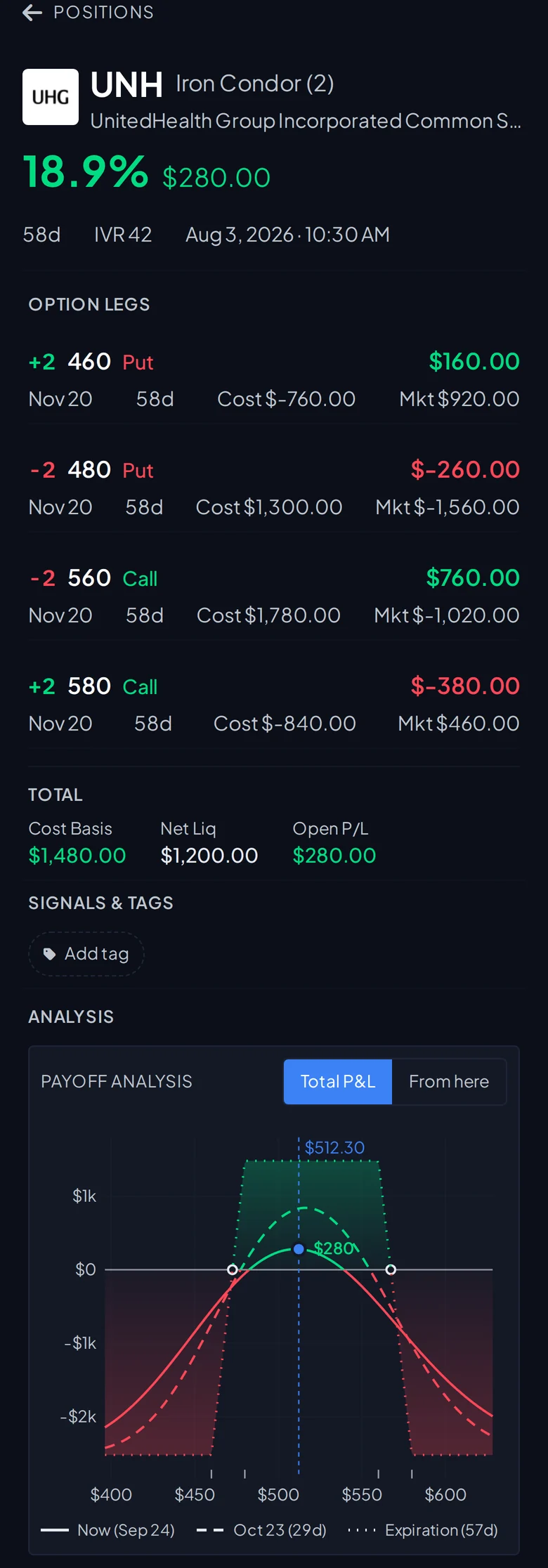
Open any position for its payoff curve. Today, a date you pick, and expiration, with break-evens and the current price marked. Key levels, Greeks, probability of profit, and max profit and loss sit right above it. On a rolled position, the curve includes what the chain already banked.

Payoff analysis for a UNH iron condor: profit and loss curves for today, 29 days out, and expiration, with break-evens, key levels, Greeks, and max profit and loss
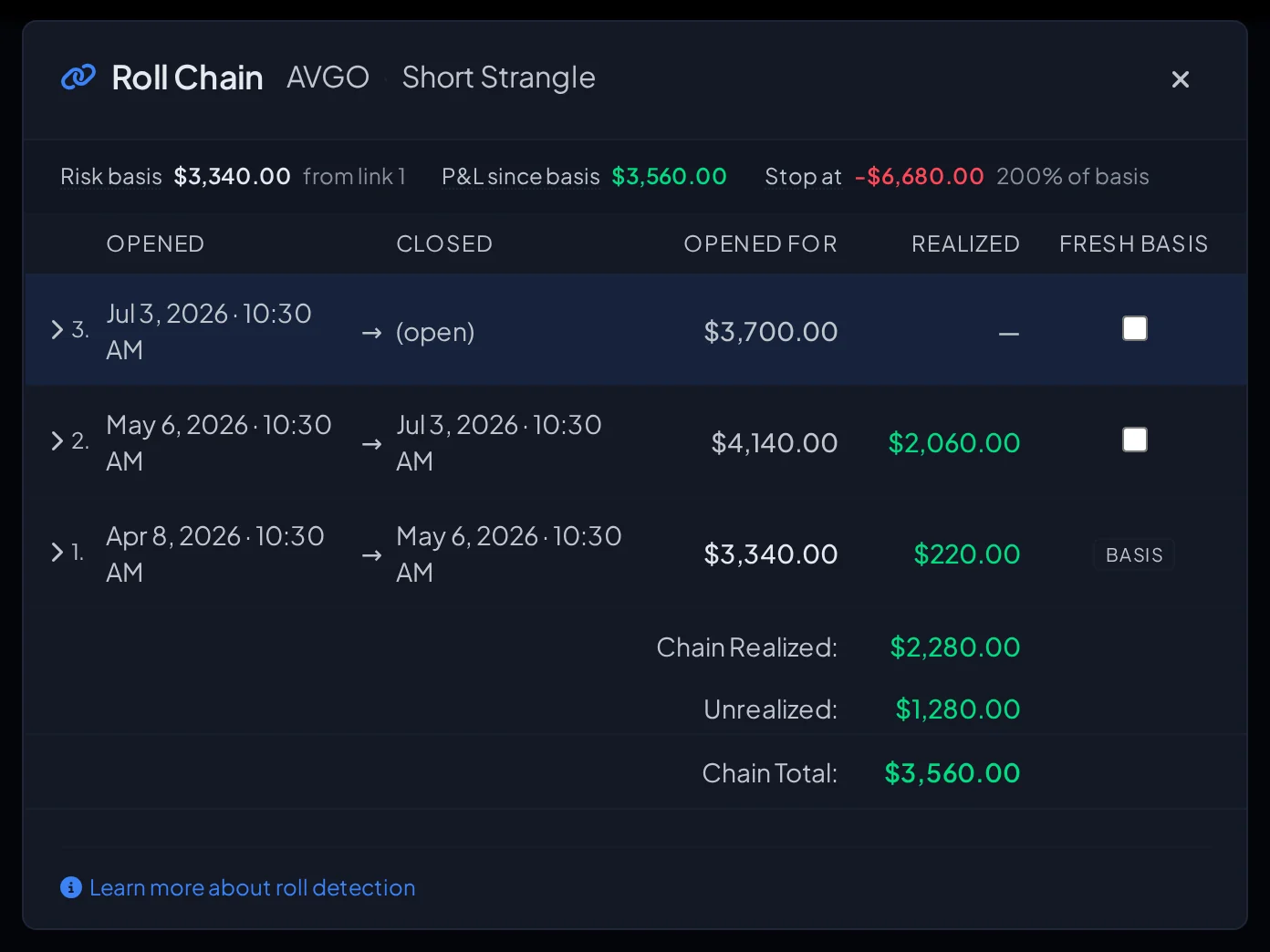
Roll chain for an AVGO short strangle: three links, what each opened for, realized P&L per roll, and the chain total

The whole roll chain in one place

Each roll, what it opened for, and what it realized. The chain total is the number that matters.

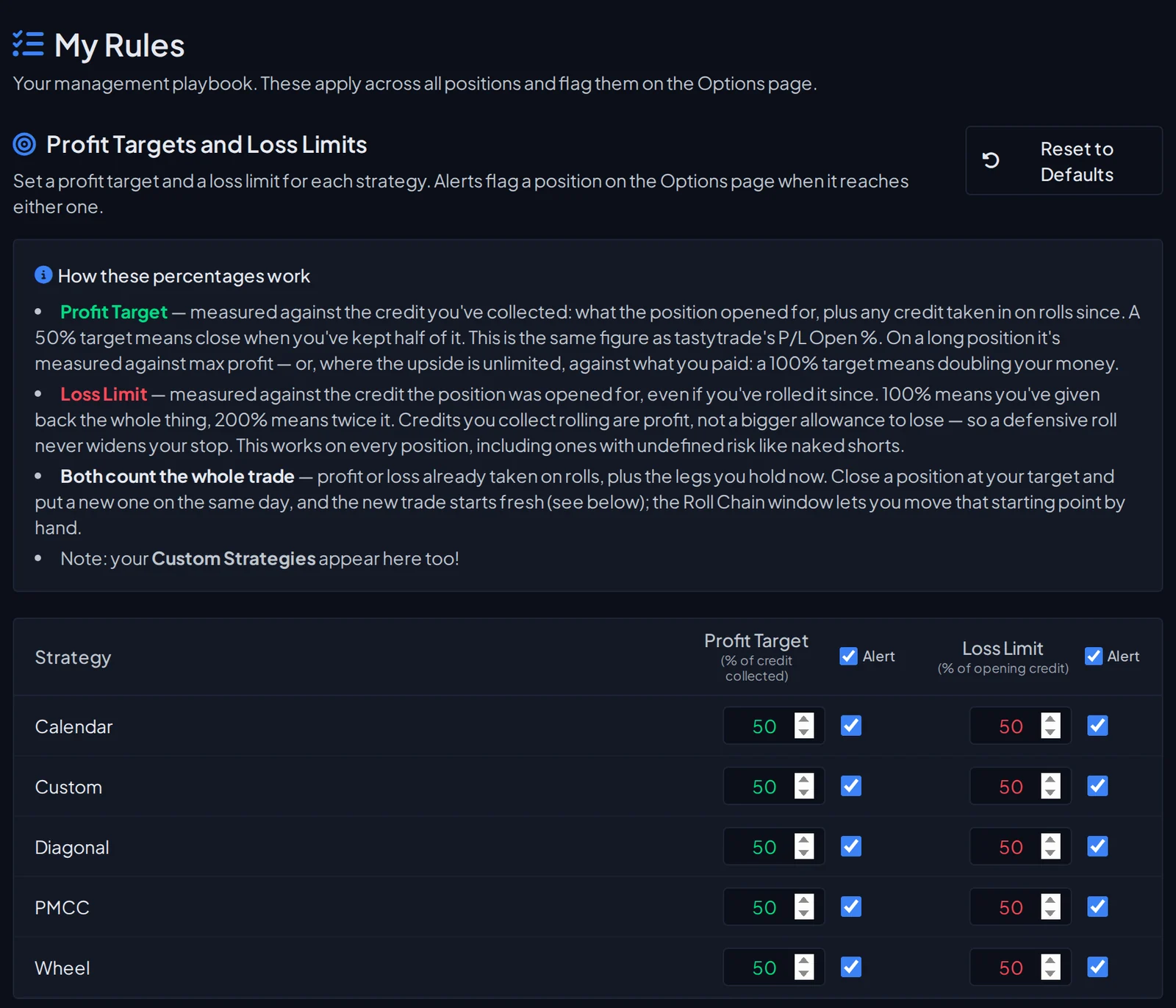
My Rules page: profit target and loss limit percentages per strategy, with alert toggles

Your management rules, enforced

Set a profit target and loss limit per strategy. Positions get flagged the moment they hit your numbers.

Features

Built for how you actually trade.

01

Automatic Chain Tracking

An options position tracker with full roll history. Every opening, roll, and closing linked together — see the complete lifecycle of a trade, not isolated transactions.

02

Strategy-Level P&L

Iron Condors, verticals, and covered calls are identified automatically — no manual tagging — so your profit and loss is broken out by strategy, not just by ticker.

03

Real P&L Across Rolls

A tastytrade P&L tracker that understands chains. Know your actual profit or loss across an entire sequence of rolls, not just individual legs. Rolling a position doesn't mean starting over.

04

Live Portfolio View

See all open positions with real-time P&L, days to expiration, and price-relative indicators. Tag and add notes to any position.

05

Updates the Moment You Fill

A direct tastytrade connection means new fills land in OptionLedger within seconds — your positions, P&L, and account balances stay live without a manual sync. Live buying power and net liquidity, right alongside your trades.

06

Custom Strategies & Targets

Beyond the built-in strategies, define your own — 1-1-2s, PMCCs, Jade Lizards, whatever you trade. Set profit-target and loss-limit alerts on any strategy, custom ones included, and OptionLedger flags positions the moment they hit your numbers.

07

Every Account, One View

Connect multiple tastytrade accounts — IRA, margin, and more — and see your positions, chains, and P&L together or one account at a time.

On Your Phone

Your whole book, in your pocket.

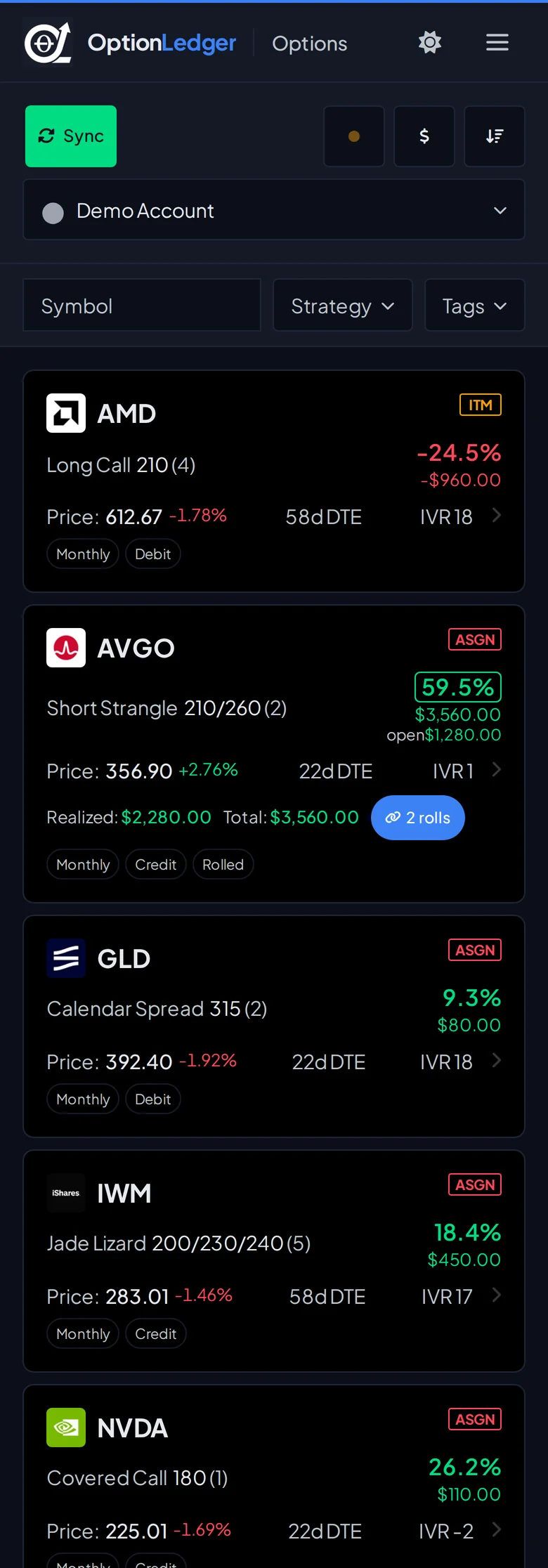
The same positions, P&L, roll chains, and payoff charts on your phone. No app to install. Open it in the browser and sign in.

OptionLedger on a phone: position cards with strategy, return, P&L, and roll count
Iron condor detail on a phone: option legs, totals, and the payoff chart
How It Works

Up and running in minutes.

1

Connect

Link your tastytrade account in seconds with secure OAuth.

2

Sync

One click imports your complete trade history — then new fills sync automatically as you trade.

3

Analyze

See your trades organized into chains with accurate P&L across every roll.

Security

Your account stays safe.

We take security seriously. OptionLedger uses tastytrade's official OAuth system and needs only read-only permissions. We never have access to place trades, move money, or modify your account in any way.

Read-Only Access

Tastytrade OAuth with no "Trade" permission. We can view your history but never place orders or move funds.

Official OAuth

We never see your tastytrade password. Authentication goes directly through tastytrade's official API.

Revoke Anytime

You control access. Disconnect OptionLedger from your tastytrade account at any time with one click.

Frequently Asked

Questions, answered.

Does OptionLedger work with tastytrade?

Yes. OptionLedger is built specifically for tastytrade. You connect with official tastytrade OAuth, and we import your full trade history automatically. No CSV exports, no manual entry, no browser extension.

Can it automatically track rolls on multi-leg options strategies?

Yes — this is the core of what OptionLedger does. Iron Condors, verticals, strangles, and other multi-leg positions are grouped into chains. When you roll a leg, the new leg is automatically linked to the original chain so your cost basis and P&L carry forward across every roll.

How is OptionLedger different from TradesViz, TradeZella, or TraderSync?

Those tools were built for stock traders and bolted options on later. They treat each transaction as independent, so a rolled Iron Condor looks like a closed trade and a new trade — not a single position. OptionLedger was designed for options from day one: chains, rolls, adjustments, and multi-leg strategies are first-class concepts, not afterthoughts.

How does it calculate P&L across an entire roll chain?

Every transaction in a chain contributes to an aggregate P&L for the underlying position. Credits received on opening, debits paid on rolls, commissions, and the final closing price all roll up into a single number — so a chain that was opened for $1.20, rolled twice for $0.30 and $0.15 in credits, then closed for $0.40 shows you made $1.25 on the full lifecycle, not three separate trades to reconcile.

Is my tastytrade account safe?

Yes. OptionLedger uses tastytrade's official OAuth system and requests only read-only permissions. We can view your trade history but cannot place orders, move funds, or modify your account in any way. You never share your tastytrade password with us, and you can revoke access at any time from your tastytrade settings.

Is OptionLedger free?

Free for 30 days, with every feature and no card on file. The clock starts when you connect tastytrade. After that it's $19 a month billed annually, $29 month-to-month, or $399 once for lifetime access. See the pricing page.

30 days free

Stop wrestling with spreadsheets.

Try every feature free for 30 days. Create your account and connect tastytrade in minutes.

Create your account →

30 days free · connect tastytrade with read-only access

Want a look first? Try the live demo — no account needed.

Not ready yet? Get product updates.

We'll only email you about product updates. No spam.